Club Caddie Mobile App Gets a Fresh New Look—Now Live!
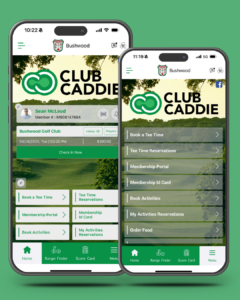
We’re excited to unveil the brand-new user experience for the Club Caddie Mobile App—built to delight your golfers and give your course even more customization options. This isn’t just a facelift—it’s a fully enhanced mobile experience that gives both golf operators and players more control, more personalization, and a modern look and feel.
What’s New?
- Customizable Landing Page
Showcase your course with a custom image or video that greets users the moment they open the app. Golf facilities can also create a video introduction to highlight amenities, promotions, or upcoming events directly from the app landing page.
- Personalized Home Menu
Golfers can now customize their own home screen by clicking the edit icon above the six home screen menu options. This takes them to the Edit Favorite Menu screen, where they can select and unselect which modules they want featured.
Note: Users can only choose from modules your facility has enabled in the app. - Full Module Access via the “Menu” Button
Located in the bottom right corner, this menu lists all active modules selected by your facility. Golfers can easily tap into any of the available options, even if they haven’t favorited them on their home screen. - Favorite Course Feature (for MCOs)
Multi-course operators can now offer golfers the ability to set a “home” course, making it even easier to book and browse their go-to club. - Streamlined Look and Feel
The new design delivers a cleaner, faster, and more intuitive experience—from tee time bookings to food ordering and more.
Upgrade Your App Now – Click Here